
Page 3: Marketing Summary, Package Contents
Marketing Summary
Package Contents
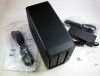
Synology packages the standard accessories with the DS712+. You get the AC adapter and power plug, a welcome guide with software, a set of screws, two drive locking keys, and the DS712+.
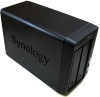
The DS712+ is a very different piece of technology than the DS2xx series reviewed in the past. Gone is the white plastic casing that feels very SOHO and in is the black metal external and smooth looking lines. This product is marketed for more than the small office / home office crowd, it has beefed up specs to put it more in-line with server room type of hardware for medium businesses. While it may not be a full desktop/workstation, as a server, it gets the job done well.
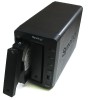
The front of the DS712+ contains the indicator LEDs, power button, USB copy button (more on that later) and USB 2.0 port, and the two drive bays with quick swapping cradles. They are hot swappable, but you should only swap them when a drive is bad or you are upgrading. While we go on removing drives for testing how the device handles failure, this is not something we recommend (obviously). To remove a drive, you simply press the bottom of the handle and it pops out allowing you to pull the drive out.
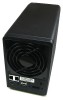
The back of the DS712+ has a larger 92mm fan to keep the device cool while performing network duties. This larger fan allows greater airflow with a lower noise profile. We only noticed a gentle hum out of the DS712+, but the drives were louder than the fan at certain times. The ports on the back include two gigabit Ethernet, two additional USB ports, an external SATA port, the DC power port, and a locking adapter (laptop style). The dual LAN ports allow for link aggregation, if your network supports it.
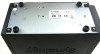
The bottom of the DS712+ has a bunch of screws and the rubber feet. These are quality and are screwed into the base. They aren't held in by glue that will eventually dry up and fall off. The screws holding the face plates can be removed to gain access to the internals of the DS712+.
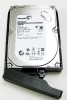
Our test device came loaded with 1TB Seagate Barracuda drives in RAID 1 (mirroring). They simply screw in to this drive caddy and get inserted into the DS712+, ready to work. The new software supports Synology's Hybrid RAID, in addition to the normal options. It allows you to add different size disks and still get the benefits of RAID (good and bad, if you want).
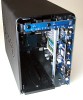
With the front face off, you can see what we're dealing with. You get a 1.8GHz Atom D425 CPU with Hyperthreading, meaning the processor can handle 2 threads at once. It is only a single core. The DS712+ comes with a 1GB DDR3 SODIMM. Like most network devices today, this is a whole computer on a board. It is also x86-64, not ARM... if that floats your boat.
Quote
DS712+
High-performance & Scalable 2-bay All-in-1 NAS Server for SMB Users
Synology DiskStation DS712+ offers a high-performance, scalable, and full-featured network attached storage solution that meets the needs of small and medium-sized businesses that require an efficient way to centralize data protection, simplify data management, and rapidly scale storage capacity with minimal time spent on setup and management. The Synology DS712+ is backed with Synologyâs 3-year limited warranty.
http://www.synology.com/products/product.php?product_name=DS712%2B&lang=us
Package Contents
Synology packages the standard accessories with the DS712+. You get the AC adapter and power plug, a welcome guide with software, a set of screws, two drive locking keys, and the DS712+.
The DS712+ is a very different piece of technology than the DS2xx series reviewed in the past. Gone is the white plastic casing that feels very SOHO and in is the black metal external and smooth looking lines. This product is marketed for more than the small office / home office crowd, it has beefed up specs to put it more in-line with server room type of hardware for medium businesses. While it may not be a full desktop/workstation, as a server, it gets the job done well.
The front of the DS712+ contains the indicator LEDs, power button, USB copy button (more on that later) and USB 2.0 port, and the two drive bays with quick swapping cradles. They are hot swappable, but you should only swap them when a drive is bad or you are upgrading. While we go on removing drives for testing how the device handles failure, this is not something we recommend (obviously). To remove a drive, you simply press the bottom of the handle and it pops out allowing you to pull the drive out.
The back of the DS712+ has a larger 92mm fan to keep the device cool while performing network duties. This larger fan allows greater airflow with a lower noise profile. We only noticed a gentle hum out of the DS712+, but the drives were louder than the fan at certain times. The ports on the back include two gigabit Ethernet, two additional USB ports, an external SATA port, the DC power port, and a locking adapter (laptop style). The dual LAN ports allow for link aggregation, if your network supports it.
The bottom of the DS712+ has a bunch of screws and the rubber feet. These are quality and are screwed into the base. They aren't held in by glue that will eventually dry up and fall off. The screws holding the face plates can be removed to gain access to the internals of the DS712+.
Our test device came loaded with 1TB Seagate Barracuda drives in RAID 1 (mirroring). They simply screw in to this drive caddy and get inserted into the DS712+, ready to work. The new software supports Synology's Hybrid RAID, in addition to the normal options. It allows you to add different size disks and still get the benefits of RAID (good and bad, if you want).
With the front face off, you can see what we're dealing with. You get a 1.8GHz Atom D425 CPU with Hyperthreading, meaning the processor can handle 2 threads at once. It is only a single core. The DS712+ comes with a 1GB DDR3 SODIMM. Like most network devices today, this is a whole computer on a board. It is also x86-64, not ARM... if that floats your boat.